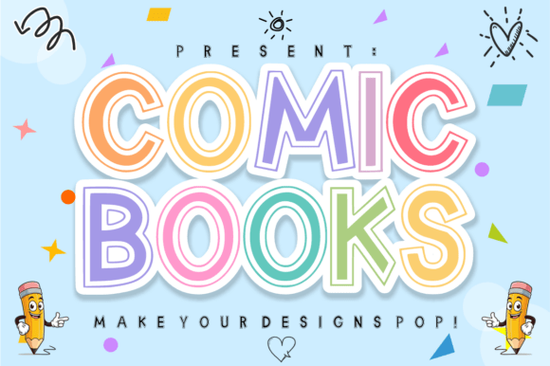
If you're looking for a display font that captures the playful energy of classic comics while keeping a clean, modern look, Comic Books Font from Creative Fabrica is worth checking out. Its double-outline style makes it stand out for kids’ projects, stickers, and headlines. Instead of the usual solid letterforms, this font gives you built-in outlines and a hollow inline detail that’s perfect for layering colors or creating custom effects.
Why choose a double-outline display font?
Double-outline fonts let you add depth and dimension without extra design work. In the case of Comic Books Font, the two strokes create a natural “hollow” center that you can fill with different hues. This works great for:
- Layering colors – Use the inside area as a background color and the outer outline as a contrast accent. You can even add gradients.
- Sticker designs – The built-in outline gives each letter a ready-made sticker border, saving you time in vector software.
- Kid-centric branding – Playful, bold lettering fits toy packaging, birthday party invitations, or children’s book covers.
How can I use this font for print-on-demand?
If you sell on Redbubble, Printful, or similar platforms, Comic Books Font can speed up your mockup process. Because the letters already have a clean outline, you can drop them onto any background and they’ll pop. Consider using it for:
- T-shirts with superhero slogans
- Phone cases featuring comic-style quotes
- Tote bags with funny kid phrases
- Posters for nerdy or retro themes
The bold structure also holds up well at smaller sizes, so you don’t lose readability when printing on mugs or stickers.
What other fonts pair well with Comic Books?
Since this is a display font, you’ll want a simple body font to avoid visual clutter. But if you’re building a full kid-friendly collection, here are a few Creative Fabrica fonts that complement the comic vibe:
- Funky Grunge Font – Adds a worn, edgy texture that works well for comic book villains or older audiences.
- Strawberry Milk Candy Font – A softer, sweeter alternative for girly or pastel projects.
- Simple Stacked Font – Layered letters that give a 3D effect without outlines, great for headlines.
- Varsity Sport Army Font – A chunky sporty style if you’re going for team-related kids’ designs.
Mixing these with Comic Books Font lets you create consistent branding across different products while keeping variety.
Is it easy to layer colors with the inline detail?
Yes. The “hollow” inline space is wide enough that you can fill it with a second color using clipping masks in most design software. For example, in Adobe Illustrator or Affinity Designer, you can duplicate the text, expand strokes, and then divide the paths. In Canva, you can add a colored shape behind the text and adjust the letter spacing to let it peek through. The developers made the outline smooth and consistent, so you won’t get jagged edges when scaling up.
If you’re new to layering fonts, a quick tip: start with a bold color for the outer outline (like black or dark blue) and a lighter shade (yellow, pink, or white) for the inner area. This gives that classic comic "pop" effect without overcomplicating things.
What should I look for in a kids’ display font?
Beyond the visual style, readability is key. Comic Books Font keeps each letter distinct even with the double outline. The uppercase and lowercase letters are both clear, which matters when young children are the audience. Also make sure the font includes basic punctuation and numbers – this one does, so you can write complete phrases like “Super Birthday!” or “5th Grade Hero.”
Another practical factor is file format. Creative Fabrica offers this font in OTF and TTF formats, both of which install easily on Windows and Mac. No extra conversion steps needed.
Practical tip: Test with a color combo first
Before buying, grab the free trial version (if available) or check the preview images on the product page. Try typing your main slogan in Comic Books Font and layering it over a solid rectangle. Adjust the tracking and size until the inline space looks balanced. If you’re designing for print-on-demand, print a sample at actual product size to see how the outlines hold up.
For a quick start, here’s a simple checklist:
- ✔ Download the Comic Books Font file from your Creative Fabrica account.
- ✔ Install the OTF or TTF font on your computer.
- ✔ Open your design tool (Canva, Illustrator, Photoshop, etc.).
- ✔ Type your text and set the font to Comic Books.
- ✔ Duplicate the text layer and change the color of the bottom layer to your outline color.
- ✔ Align the two layers (or use the inline structure if you prefer a single layer).
- ✔ Export your design as a transparent PNG or high-res PDF.
That’s it. No complicated effects needed – just a playful font that does half the work for you.
Try It Free Vintage Barbie Fonts for Design & Craft Projects
 Crafty Bloom Font: Friendly Designs & Creative Uses
 The Farmstead Font for Rustic Design Projects
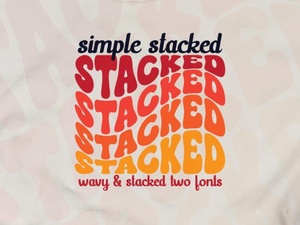 Crafting Elegant Designs with a Simple Stacked Font
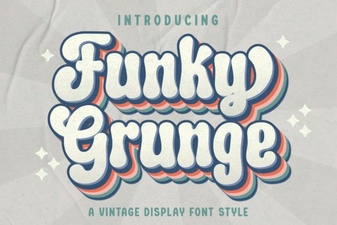 Grunge Fonts: Bold Designs & Creative Projects
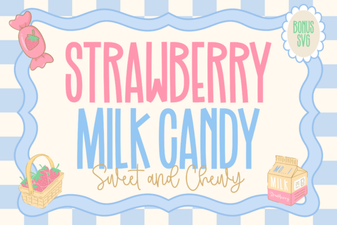 Font Style Ideas Using Strawberry Milk Candy